
01
SEVERAL LISTS, ZERO FRICTION
Every list, your way.
Pin the lists you use every day, swipe to check items off, and group them by aisle.

 SeeListPrivate lists. Shop smarter.
Private lists. Shop smarter.
SeeList: save recipes, add ingredients to your grocery list and share shopping with others. Offline lists, no account, and an Apple Watch companion.

SEVERAL LISTS, ZERO FRICTION
Less remembering.
More living.
Your recipes, your groceries, your shared lists. Plan dinner, add its ingredients and shop together, without creating an account. Your personal lists stay on your device; only the lists you choose to share are synced online.
What it does
SEVERAL LISTS, ZERO FRICTION
Pin the lists you use every day, swipe to check items off, and group them by aisle.
A CATALOG THAT SPEAKS 12 LANGUAGES
Search forgives typos and understands synonyms and how words sound — ‘tomatos’ finds tomatoes.

YOUR OWN ITEMS, YOUR OWN WAY
Quantity, unit, a note, and four behaviours for bought items — SeeList adapts to how you actually shop.
A CATALOG THAT SPEAKS 12 LANGUAGES
Search forgives typos and understands synonyms and how words sound — ‘tomatos’ finds tomatoes.
SHARE, WHEN YOU DECIDE TO
Send a copy of your list as a single link, or share it live: everyone watches items being checked off in real time.
One link to edit, one link to view only. Sharing stops whenever you want, and a forgotten shared list disappears on its own after 30 days. Still no account.
It just opens. Even a shared list can be edited offline: your changes go out when the connection comes back.

MY RECIPES
Keep ingredients and preparation steps together, save your favourites and add a recipe’s ingredients to a shopping list. Your saved recipes remain available offline. On compatible devices, the local assistant helps you create a recipe to review before saving.
Ask for a recipe’s ingredients or a week of groceries: Apple Intelligence on iOS and Gemini Nano on Android process your request on the device, with no server.
You see an editable preview and confirm the list before anything is added. On a device without an on-device model, the assistant is simply unavailable — everything else works.

Apple Watch · iPhone
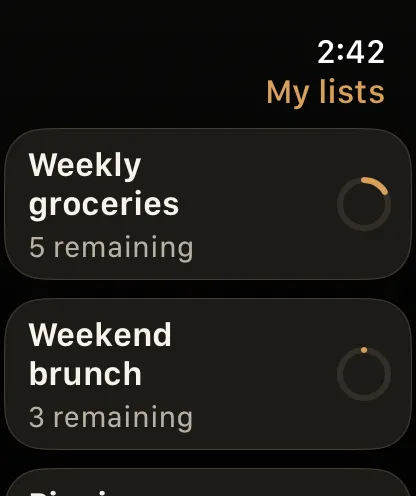
Open your lists and check off groceries on Apple Watch, paired with your iPhone. Changes return to the phone when the connection is available. No need to take your iPhone out for every item.
Privacy Policy
Your recipes, your groceries, your shared lists. Plan dinner, add its ingredients and shop together, without creating an account. Your personal lists stay on your device; only the lists you choose to share are synced online.
Privacy Policy →What it does
BACKUP, WITHOUT A SEELIST ACCOUNT
Back up and restore your data in your own iCloud on iOS or Google Drive on Android, without a SeeList account.

SEVERAL LISTS, ZERO FRICTION
Pin the lists you use every day, swipe to check items off, and group them by aisle.
YOUR OWN ITEMS, YOUR OWN WAY
Quantity, unit, a note, and four behaviours for bought items — SeeList adapts to how you actually shop.
SIRI AND VOICE
Dictate a request in the app and it is transcribed on the device.
Questions & answers
Yes. SeeList is available for iPhone on the App Store and for Android on Google Play.
SeeList is local-first: lists live on your device. You can back them up to your own iCloud (iOS) or Google Drive (Android) and restore them on another device. There is no SeeList server. To share a list with someone else, see the next question.
Yes, in two ways. You can send a copy of the list as a single link: whoever receives it reviews it before adding it to their own app, and nothing is stored anywhere. Or you can turn on live sharing: the list is then hosted in Europe under an anonymous identifier, and invited people see items being checked off in real time. You hand out either an edit link or a view-only link, and you can stop sharing at any time. A shared list disappears automatically 30 days after its last change. Sharing still requires no account, and only the lists you explicitly share ever leave your phone.
Yes. Your lists, the complete product catalog, smart search, custom items and saved recipes all work without a connection. Only ads and an optional cloud backup need internet access.
Yes. Create, rename, duplicate, pin and reorder as many lists as you need. A deleted list can be restored for 24 hours.
Typed requests are processed by the on-device model — Apple Intelligence on iOS or Gemini Nano on Android — and are never sent to a SeeList server. You review an editable preview before anything is added. Voice input is handled by your device's speech services under its settings. On unsupported devices, lists and the catalog still work fully.
Yes. Keep ingredients and steps together, mark recipes as favorites, and add their ingredients back to any list whenever you cook them again. Recipes stay available offline.
Yes. SeeList is free and funded by Google AdMob. Ads are never targeted from the content of your lists, appear only when you are online, and follow your consent choices. AdMob may process technical device and ad-interaction data as explained in the privacy policy.
The interface and the catalog are available in English, French, German, Spanish, Italian, Dutch, Portuguese (Brazil and Portugal), Swedish, Danish, Norwegian and Finnish.
Microphone and speech recognition only when you dictate a request; photo library only when you choose to import an image; tracking permission only to show more relevant ads, if you allow it.
Keep ingredients and preparation steps together, save your favourites and add a recipe’s ingredients to a shopping list. Your saved recipes remain available offline. On compatible devices, the local assistant helps you create a recipe to review before saving.
Open your lists and check off groceries on Apple Watch, paired with your iPhone. Changes return to the phone when the connection is available. No need to take your iPhone out for every item.

Available on · App Store · Google Play
Your recipes, your groceries, your shared lists. Plan dinner, add its ingredients and shop together, without creating an account. Your personal lists stay on your device; only the lists you choose to share are synced online.

Requires iOS 16.4 or later on iPhone (iOS 26 and an Apple Intelligence-compatible device for the on-device assistant), or Android 8 or later (a Gemini Nano-compatible device for the assistant).
SeeList
SeeList is free and funded by ads. Ads are never targeted from the content of your lists, are shown only online, and follow your consent choices (UMP/ATT).